











New Answers, books, texts and gets you paid. You just do the work.

The AI Revenue System & Voice Agent for Home Services & Contractors

More than an AI answering bot — the phone service and revenue routing system that books more jobs for home-service pros.

It answers every call and text, day and night, and knows who’s calling before you say hello: whether they live in a $2M home or rent a studio, every past job with your shop, and 150+ signals more. Then it runs on autopilot. It books the job on your techs’ real calendars, sends the confirmation, the reminder, the pay link and the review request, and shows you what it earned in dollars. You never lift a finger.

Owns or Rents Address & Distance House or Apartment Home Value Years in Home 150+ Signals Total
Live in a few minutes · $0 today · no contracts
Incoming call · answered by AI
00:04

Jason Miller

Homeowner · 4.8 mi away · past customer

Job descriptionNo hot water — possible hot water heater replacement
Address1234 Hillcrest Dr.
Property typeSingle-family home
Home valueEst. $3.4 Million
Distance to job4.8 miles · 18 minutes
Owner or renterHomeowner
RoutingPriority call
AI answers in your shop’s name

“Thanks for calling, Jason. I can have a tech at your place on Hillcrest by 2 PM today — should I lock that in?”

Routed by your rules Home-value and distance rules can ring a person first.
Industry’s largest

The largest demographic database in voice AI.

CallerWho is powered by 2+ trillion data points covering 3+ billion people — pulling 150+ signals on every caller, in milliseconds. No other voice AI even comes close.

2+ Trillion
Demographic data points
3+ Billion
People in the database
150+
Signals per caller
  • Caller home address lookup — AI voice agent resolves caller address and service zone in real time
  • Caller home value estimate — AI voice agent surfaces estimated property market value for lead qualification
  • Caller dwelling type — AI voice agent classifies single-family home, condo, apartment, or mobile home
  • Caller homeowner vs renter status — AI voice agent identifies the highest-value signal for home services lead qualification
  • Caller monthly rent estimate — AI voice agent surfaces estimated rent for rental property callers
  • Caller estimated net worth — AI voice agent wealth signal for prioritizing high-ticket contractor jobs
  • Caller estimated household income — AI voice agent lead scoring signal for HVAC, plumbing, roofing contractors
  • Caller occupation identification — AI voice agent infers caller industry and role to qualify the lead and tailor the pitch

Explore all 150+ caller signals →

Product overview

See how CallerWho works.

A walk-through of how the AI uses caller intelligence to answer, qualify, and book real jobs — for HVAC, plumbing, electrical, roofing, and every other home service trade.

3:50 · DEMO

Full product walk-through · Watch on its own page →

The problem

Three ways your phone is costing you jobs.

Home service contractors lose thousands every month to calls that go unanswered, unqualified, or mishandled. Here’s where the money disappears.

$4,800+/mo lost

Missed after-hours calls

62% of home service calls happen outside business hours. Every missed call is $200–$1,200 in lost revenue walking out the door — and 85% of callers won’t leave a voicemail.

Our AI → Answers 24/7, books on the spot, and turns after-hours ringing into revenue while you sleep.
23 hrs/mo wasted

Dead-end calls waste tech time

Your $85/hr technician shouldn’t be answering questions about your hours. Tire-kickers, wrong numbers, and unqualified inquiries drain profit straight from your bottom line.

Our AI → Handles FAQs, qualifies callers, and routes only real jobs to your team so techs stay billable.

1 in 5 calls mishandled

Inconsistent call handling

New receptionist quotes the wrong price. Fill-in staff forget to ask for the address. One bad call loses one customer forever — and you’ll never know it happened.

Our AI → Follows your script every time, captures every detail, and delivers a consistent premium experience.

Your numbers

What is your phone actually worth?

Three inputs, one honest number — what the calls you’re missing are worth when every one gets answered, against what CallerWho costs.

Calls you miss Booked jobs you win back
Total back on your books every year
$132,480
Booked jobs you win back $132,480/yr
~55× the cost of CallerWho
Cost $199/mo: $49 line + $2 × 75 new callers (assumes half your calls are new) — no charge for spam or repeat calls
$11,040 / month $11,040 booked
Start recovering revenue
Booked revenue assumes the industry-average 46% conversion on qualified inbound calls. Your annual total also appears in Pricing below.
How it works

The AI voice agent that knows every home service caller — before the first word.

The AI doesn’t just read a script. It knows who’s calling — and your rules decide what happens with each call.

01 · SEES

Knows the caller before hello

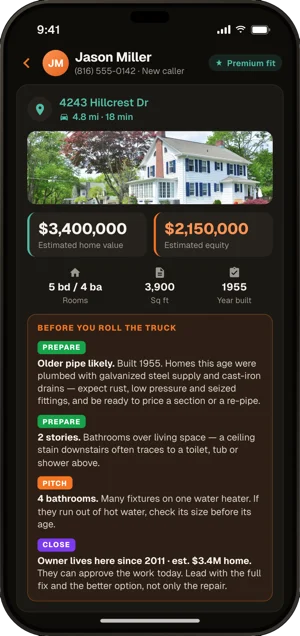
The instant a call comes in, CallerWho pulls 150+ data points on the caller — address, property type, home value, owner or renter, distance from your shop — and puts them on your ring card.

02 · SPEAKS

Greets every caller with context

It answers in your shop’s name, knows returning customers by name, address and upcoming jobs, and switches to Spanish when the caller does. Texts get answered in just about any language.

03 · BOOKS

Books real jobs. Screens the rest.

Ready-to-book callers get booked on the spot. Your rules on home value and distance can ring a person first, emergencies alert your on-call people, and spam is never billed.

Features

Everything contractors need to capture more calls — and book more jobs.

Works like a trained 24/7 team member that answers, captures, and routes the right conversations to the right people.

Not just calls

It doesn’t just answer calls — it books jobs over text.

Some customers won’t call — they text. It’s on from day one, nothing to set up: when a text lands on your business number, the same AI answers it: finds out what’s wrong, gets the name and address, offers appointment windows, and confirms the booking. You just see the job on your calendar.

  • One number, calls and texts. The same business line the AI answers is the one it texts on — no second number, no separate texting service.
  • Asks like a dispatcher. Name, address, what’s going on, best time — the same qualifying questions it asks on a call.
  • Books real work orders. The customer picks a window by text and gets a confirmation text back — and it’s a real job on your schedule, conflict-checked against your techs’ calendars, not a web form to call back.
  • You see every word. Full threads in your dashboard — type a reply in any thread and it goes out in place of the AI’s next one.
Text thread · answered by AI 9:12 PM

Hi — our AC died this afternoon and it’s 88° in here. Any chance someone can come out tomorrow?

Customer · 9:12 PM

Sorry about the heat — we can get someone out. Can I grab your name and the service address?

AI · 9:12 PM

Mike Ramirez, 4417 Brookfield Ct

Thanks, Mike. Tomorrow I have 8–10 AM or 1–3 PM — which works better?

8-10

You’re booked — tomorrow, 8–10 AM at 4417 Brookfield Ct. Confirmation text on the way. Reply here if anything changes.

AI · 9:14 PM
Booked at 9:14 PM — no phone call, nobody woken up Same AI, same qualifying questions, same calendar as your calls.
On your website too

One line of code puts a booking chat bot on your own website.

Paste one script tag into your site and a chat bubble appears. Visitors say what is wrong, pick a time from your real availability, and the job lands in your CallerWho console — the same calendar your calls and texts book into, with a confirmation text on the way to the customer.

  • One line, any website. WordPress, Wix, Squarespace, hand-built — if you can paste a script tag, it works. Copy it from Settings › Website chat.
  • Real openings, real bookings. The times it offers come from your live schedule and technicians, conflict-checked, so a web booking is a real work order — not a form somebody has to call back.
  • Stays open for changes. After booking, the chat stays live — a gate code, a second issue, a change of mind goes straight to the team with the job.
  • Included with every plan. No add-on, no per-chat fee — it comes with every line, monthly or annual.
Website chat · answered by AI 2:41 PM

Hi! You’ve reached Enviro Plumbing. I can book you an appointment — what’s your name?

Dana. Toilet leaking at the base.

Thanks, Dana. What’s the best mobile number to reach you on?

(816) 555-0142

And what address should we come to?

1920 6th St, Santa Monica

Here are the next openings — tap one: Wednesday, September 2, 6:00 AM · Thursday, 8:00 AM

You’re booked for Wednesday, September 2 at 6:00 AM. A confirmation text will be sent to (816) 555-0142. Thanks, Dana!

AI · 2:43 PM
Booked from the website at 2:43 PM <script src="my.callerwho.com/widget.js" data-callerwho-key="…"></script> — that is the whole install.
The CallerWho app

Run the whole shop from the truck.

Your calls, texts and jobs on your phone, from your business number. See who’s calling before you answer, roll to the job, get paid in the driveway, and never lose track of a customer who needs you.

Get it on Google Play iPhone Coming to the App Store
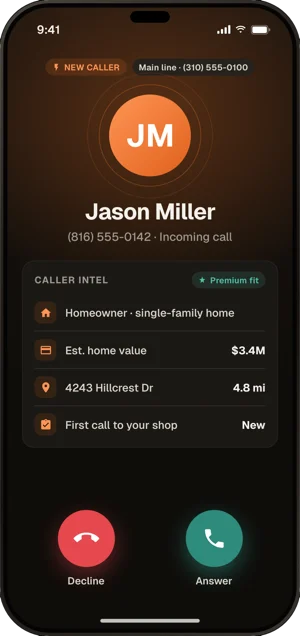
  • The ring card on an incoming call: Jason Miller, new caller, homeowner in a single-family home, estimated home value $1.24M, 4.8 miles away, first call to your shop

    Who’s calling, before you answer

    Owner or renter, home value, how far away, and whether they’ve called you before.

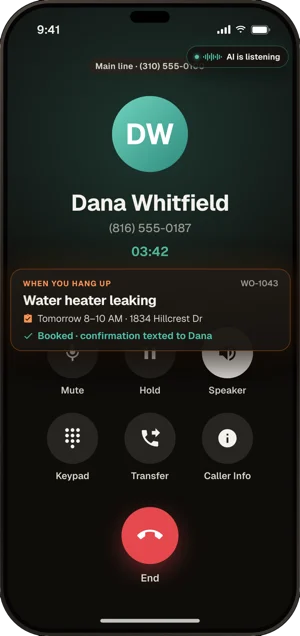
  • A call you answered with the AI listening: when you hang up, the water-heater job is booked for tomorrow 8 to 10 AM and the confirmation is texted to the customer

    You answer, the AI writes it up

    Take the call yourself. Hang up, and the work order is booked and the customer is texted.

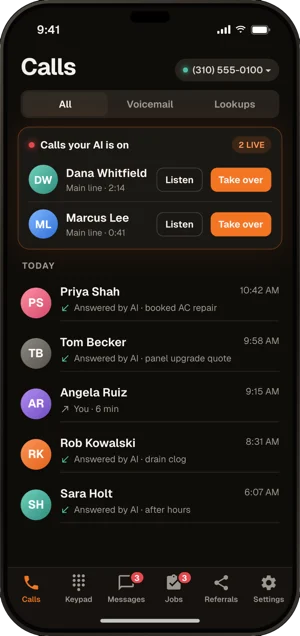
  • The Calls tab: two calls the AI is on right now, each with Listen and Take over buttons, above today's calls answered by the AI

    Listen in or take over

    See every call the AI is on, and step in with one tap.

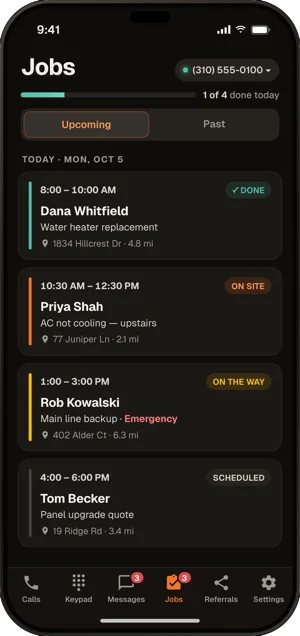
  • The Jobs tab: today's four jobs in order with arrival windows, addresses, miles away and status: done, on site, on the way, scheduled

    Today’s jobs

    Your day in order, with times, addresses and where each job stands.

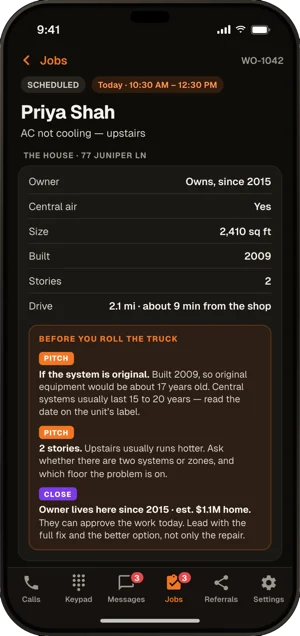
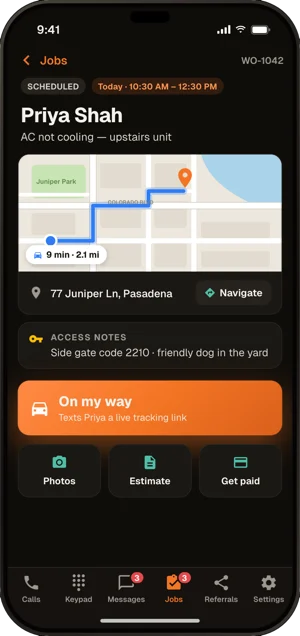
  • A job: map and Navigate button, access notes with the side gate code and a friendly dog, an On my way button that texts the customer a tracking link, and Photos, Estimate and Get paid buttons

    Tap On my way

    Maps in one tap, and your customer gets a link to watch you arrive.

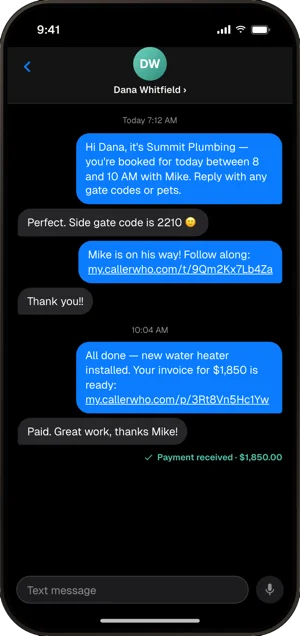
  • A text thread from the shop's number: booking confirmation, the customer's gate code, an on-the-way tracking link, and the invoice with a pay link, marked payment received

    Texts that get you paid

    Booking, on-the-way and invoice texts go out from your business number.

  • Ring card. Who’s calling, and if they own the home, before you say hello.
  • Your business number. Calls and texts from the shop’s number, not your personal cell.
  • Voicemail. Every message written out, so you can read it between jobs.
  • Today’s jobs. Times, addresses, gate codes and notes, and a copy in your phone’s calendar.
  • On my way, with maps. One tap to navigate, and your customer gets a tracking link.
  • Estimates and invoices. Write them on site and text them before you leave.
  • Photos. Snap the job, before and after, right on the work order.
  • Payment requests. Text a pay link and get paid on the spot, to your own account.
  • Needs Attention. Missed calls, texts, promised call backs and jobs not billed yet, in one list with Call and Text buttons.
  • Push alerts. Know the moment a call, a text, a big job or a call-back request comes in.
How every call pays

Three ways your phone earns its keep.

After hours, only get woken for calls worth interrupting you. During the day, every job goes to a tech who can do it. And the calls you can’t take? Those pay too.

01 · Call escalation

Only wake your team for calls worth waking up for.

Stop waking your team for every 2 AM call.

During an after-hours call, the AI texts or emails your on-call people only for emergencies, or for homes above a value you set. The AI checks every call — you just set the rule once.

  • Home value above your chosen threshold
  • Texted or emailed while the caller is still on the line
  • Emergencies — flooding, gas, no heat
Burst pipe at 2 AM emergency · $1.2M home
→
Alert on-call
Routine scheduling non-urgent · existing
→
Keep with AI
Dripping faucet not an emergency · $640k home
→
Booked for the morning
02 · Smart routing

The right tech, for the right job.

Not every tech should get every call.

The AI books the tech whose skills, working hours and open slots fit the job, and spreads the work by each tech’s load. Per-line rules can ring a person first when the caller’s home value or distance says so.

  • Matched by each tech’s skills tags
  • Only inside each tech’s working hours
  • Home-value and distance rules ring a person first
Heat pump install needs heat-pump skill
→
Marcus · heat pumps open at 2 PM
Routine filter change existing · 3 mi
→
Diego · maintenance lightest day
New system quote $2.1M home · home-value rule
→
Your phone rings first ring card on screen
03 · Profit center

The jobs you can’t take still pay you.

Wrong trade, outside your area, or no time that works for the caller? Those calls used to be a “sorry, we can’t help.”

Now the AI offers the caller one of your referral partners — a shop that has agreed to pay you a fee on every job you send them. With the caller’s yes, it texts your partner the job and texts the caller your partner’s name and number, and the fee is logged on your Referrals page. Your phone becomes a profit center.

  • Only partners you add, only for the work and ZIP codes you list
  • Nothing is passed on without the caller’s yes
  • Every referral and the fee it owes you, tracked in one place
"Need an electrician" work you don’t do
→
Sent to your partner
referral fee logged
"Furnace is out" outside your area
→
Sent to your partner
referral fee logged
"Can someone come today?" you’re booked solid
→
Sent to your partner
with the caller’s yes
Trucks rolled
0
on the jobs that paid you a fee
What sets it apart

Six things that set CallerWho apart. At $49 a line.

Individually, each one wins calls. Combined, they change the economics of every phone line you run.

Industry first 01

Pre-call caller intelligence

Before the AI says hello, it has 150+ signals on the caller: address, owner or renter, property type, estimated home value, distance from your shop. Every competitor answers blind.

150+ signals · before hello

02

Knows who’s calling, greets them with context

Returning customers are known by name, address and upcoming jobs. Past jobs, open estimates and unpaid invoices show on the ring card while it rings, and new callers and customers ring with different tones.

Ring card · caller history · separate ring tones

03

Home-value-aware call escalation

After-hours alerts tied to the caller’s home value. Only wake your tech for emergencies or homes over $900K. Competitors with escalation use keywords or time-of-day — they can’t see the caller’s home value.

Emergencies · home value · distance rules on the ring

04

Matches the job to the tech’s skills and schedule

The AI picks the tech by skills, working hours, open slots and workload, then books a real job on that tech’s calendar. Want it moved? Drag it to another tech on the Dispatch Board.

Skills · hours · open slots · workload

05

Out-of-area jobs: you decide

A job the AI books outside the towns you serve stays on the calendar, and you get a text: reply KEEP or DROP. DROP cancels it and texts the customer that the address is outside your area. Work you can’t take can go to a referral partner instead, if you turn that on.

Keep or drop by text · partner referrals

06

$49 a line, unlimited talk time

$49/mo per phone line (or $490/yr up front, 2 months free), plus $2 the first time a new caller reaches you — and talk time is never metered, so a twenty-minute call costs exactly what a two-minute one does. Per-minute competitors bill more the longer your customers talk; repeat callers, spam, robocalls, wrong numbers, and hang-ups under 20 seconds cost you nothing here. Tracking numbers and extra lines are the same $49/mo (or $490/yr), so there is no tier to get bumped into.

Monthly: cancel anytime · Annual: not refunded · live in a few minutes

Try it live

Hear the AI trained for your trade.

Pick your industry and call the line below. The AI is pre-trained on your trade’s vocabulary, common job types, and pricing logic — so you hear exactly what your customers will hear when they call your shop. Text the same number and the same AI answers by SMS.

HVAC

HVAC technicians

Cooling, heating, system replacement, refrigerant, ductwork, maintenance contracts. Text that same number too — the AI answers by text and books the job.

(818) 927-3242

Click to call or text it — free demo

Plumbing

Plumbers

Slab leaks, drain cleaning, water heaters, repipes, sewer scopes, emergency calls. Text that same number too — the AI answers by text and books the job.

(818) 927-3243

Click to call or text it — free demo

Electrical

Electricians

Panel upgrades, EV charger installs, rewires, lighting, code corrections, troubleshooting. Text that same number too — the AI answers by text and books the job.

(818) 927-3244

Click to call or text it — free demo

Roofing

Roofers

Storm damage, full replacements, leak repairs, gutters, insurance claims, inspections. Text that same number too — the AI answers by text and books the job.

(818) 927-3245

Click to call or text it — free demo

Available 24/7 · No signup · Free · Hang up anytime

Go deeper on your trade: HVAC · plumbing · electrical · roofing

Pricing

Simple pricing. No surprises.

One plan: $49/mo for each phone line (or $490/yr paid up front, 2 months free), plus $2 the first time a new caller reaches you, with unlimited AI talk time on every line. Repeat callers, spam, wrong numbers, and hang-ups under 20 seconds never cost a cent. A fraction of the cost of a full-time receptionist — see the math — and it answers nights, weekends, and many calls at once.

Your total annual impact
$132,480
~55× your CallerWho cost — back every year, from jobs you used to miss

What CallerWho puts back on your books each year — booked jobs you were missing, recovered by the same phone that answers them.

Revenue recovered · booked jobs you were missing $132,480/yr
150 calls/mo · 20% recovered · 75 new callers at $2 · no charge for spam or repeat calls

Voice AI Agent

Everything you need to capture, qualify, and close every call

$49/mo
+ $2 per new caller
Per phone line — everything included
Your main line and every line you add are the same $49 · billed monthly
Perfect for a one-man show or a 15 technician shop
Add lines for peak season anytime — no contracts, cancel anytime

A new caller is a phone number that has never reached you before. You pay $2 once, the first time they reach you, on a call that connects for 20 seconds or more. Your spouse can call twenty times a day and it costs nothing.

Never charged

  • Repeat callers
  • Spam & robocalls
  • Telemarketers
  • Wrong numbers
  • Blocked numbers
  • Hang-ups under 20 seconds

Example: 20 new callers in a month on one line = $49 + $40 = $89.

  • No setup fee. Others charge for it: FirstDial $129, Avoca $600, Signpost $199.
  • 24/7 AI call answering on first ring
  • Website chat bot that books jobs
  • Caller details on the ring card
  • Smart after-hours escalation
  • Appointment booking & scheduling
  • Call screening & prioritizing
  • Recordings, transcripts & summaries
  • Books by tech skills & schedule
  • Out-of-area jobs: keep or drop
  • Referral fees on jobs you can’t take
Card saved at sign-up — nothing charged until your first booked job + 7 days. An unused trial ends after 30 days without a call or text. $0 today · Cancel anytime · Live in a few minutes
FAQ

Questions buyers ask before they sign up.

Tap any question to expand. Start with the top 3 — or jump to the section that matches what you’re after.

Top questions
What makes CallerWho different from other AI voice agents?

Caller intelligence, not just AI speech. Before the first hello, the platform pulls 150+ signals on the caller — whether they own or rent, house or apartment, estimated home value, how long they’ve lived there, and more — and puts them on your ring card before you answer.

We identify the value of the caller’s home, whether they’re in a house or an apartment, and other property details — so a roofer knows immediately whether they’re talking to a homeowner or a renter, and an HVAC tech can prioritize the $1.2M home over the $300K one when the schedule is tight.

Can I use just the caller intelligence — without the AI voice agent?

Yes. Flip a single switch and the AI Voice Agent goes off. Your phone rings as normal and calls go straight to your team — but you still get every detail we have on the caller.

The full profile — home value, address, owner status, and the 150+ signals — appears on your screen in real time as the phone is ringing. Call routing, the after-hours alert, and the email after every call all keep working. Use CallerWho as a pure caller-intelligence layer for your live team, or flip the AI back on anytime.

Does it work with my existing phone system?

Yes. You can forward your existing line to us, port your number over fully, or run us as an overflow line alongside your current setup. No PBX changes, no developer, no integration headaches.

You can use it from the web phone, the mobile app, or any standard SIP desk phone, set up by hand. A desk phone is a real working business line: make outbound calls, take incoming calls live, use it like any office phone.

The AI is optional — flip it off entirely so every call rings your phone, or set your phones to ring first and the AI to answer only when nobody picks up. Same number either way.

Polycom VVX 600 VoIP desk phone, compatible with the CallerWho AI Voice Agent
Polycom VVX 600 · any standard SIP desk phone works
How long does setup take?

Most businesses go live in a few minutes. No developer needed.

Setup is a spoken call with Gunner, the setup assistant: it has already read your website, asks about your voice, hours, transfers and prices, and writes the AI’s instructions as you answer. No typing a script.

How much does it cost?

One plan, billed monthly or yearly up front.

  • $49/month per phone line — your main line and every line you add are the same $49, each with unlimited AI talk time (nothing is billed by the minute). Choose a new local U.S. number, or port your existing number. You can also make outbound calls from it.
  • Or $490/year per line, paid up front — 2 months free on every line: it works out to $40.83/month and saves $98 per line each year. Extra lines are $490/year too.
  • Plus $2 per new caller, billed monthly on either plan — a new caller is a phone number that has never reached you before. You pay $2 once, the first time they reach you, on a call that connects for 20 seconds or more. Every call after that from the same number is free — your spouse can call twenty times a day and it costs nothing.
  • Never charged: repeat callers, spam, robocalls and telemarketers (like the bots selling you Google listings), wrong numbers, blocked numbers, and hang-ups under 20 seconds.

Example: 20 new callers in a month on one line is $49 + $40 = $89 on the monthly plan, or just the $40 that month on the annual plan. No setup fee. Monthly: no contracts, cancel anytime. Annual: paid up front for the year, not refunded. To see what these numbers look like against your call volume and the revenue you’d recover, try the ROI calculator.

Getting started & integration

Do you train it on my business, or do I have to write all the answers?

We do the heavy lifting. During setup, we pull from your website, services, pricing, and service area to build the initial knowledge base. If you have docs, you can upload them. You review and refine — usually a few minutes of edits and you’re live.

What if I have multiple locations or service areas?

Add a line for each location or service area. Each line has its own number, hours, prices and rules — all from one dashboard.

Can I have it answer only when my team can’t pick up, or all the time?

Each line has four modes: the AI answers 24/7; your phones ring first and the AI answers after 1 to 10 rings; a person answers; or calls go to voicemail. Switch any line from the dashboard.

Can I test it alongside my existing answering service?

Yes. Many customers run us in parallel for the first week or two — same call volume, head-to-head comparison. Most cancel their answering service within 30 days.

How calls are handled

What happens if I get a sudden spike in calls — like during a storm or heat wave?

The AI answers many calls on the line at once. Talk time is unlimited and never billed by the minute, so a long call costs no more than a short one. The only charge that grows with a busy day is $2 the first time a new caller reaches you — repeat callers, spam and robocalls, wrong numbers, and hang-ups under 20 seconds stay free.

Can it transfer to a real person?

Yes. When the caller asks, the AI connects them to a number you list during your open hours, with your hold music while it rings; the person who picks up sees the caller’s own number.

For emergencies, or homes above a value you set, it can text or email your on-call people during the call. It won’t loop or argue.

Can it book appointments and capture caller details?

Yes. It collects caller info, asks qualification questions, books appointments, and hands cleanly to your team with full context. To hear it in action, watch the 90-second explainer.

How does it handle emergency vs. routine calls?

You define what counts as an emergency (no heat, water leak, no power, etc.) and the AI prioritizes accordingly — same-day booking, immediate dispatch alert, or live transfer to your on-call tech.

Can it screen callers outside my service area?

Your service area comes from the towns your website lists. When the AI books a job outside them, it stays booked and you get a text: reply KEEP to keep it, or DROP to cancel it, and the customer gets a polite text that the address is outside your area. Work you can’t take can also be offered to one of your referral partners, if you turn that on.

Can it route calls to the right tech?

Yes. The AI books the tech whose skills, working hours and open slots fit the job, and per-line rules can ring a person first based on the caller’s home value or distance from your shop.

Can it quote ballpark pricing on common jobs?

Yes, if you want it to. Load in your service call fee, common job ranges (drain clear, AC tune-up, diagnostic), and any seasonal promos — the AI will quote them accurately and consistently. Or keep pricing off the table and have it route to a human for quotes.

What if a customer texts my business number instead of calling?

It can — text answering is on for every line from day one, and the same AI replies in seconds, not hours. It asks what’s wrong, collects the name and address, offers appointment windows, and books a real work order on your schedule, conflict-checked against your techs’ calendars. The customer gets a confirmation text, every thread shows up in your dashboard, your reply in any thread goes out in place of the AI’s next one, and STOP opt-out compliance is built in.

The caller experience

Will my customers know they’re talking to AI?

Most don’t, and the ones who do are usually fine with it because the call moves fast and gets them what they need. Voices are natural, conversational, and tuned to your business. If a caller asks directly, you can configure how the AI responds — many customers have it acknowledge honestly and continue the call.

What happens when someone asks something the AI doesn’t know?

It does one of three things, based on your rules: gives a safe fallback answer, takes a message with full context, or transfers to a live person. It won’t make things up or guess at pricing it doesn’t have.

Can it handle accents, background noise, and bad cell connections?

Yes. The voice models are trained for real-world phone audio — regional accents, job-site noise, spotty cell signal, speakerphone. If audio is genuinely unintelligible, it asks the caller to repeat rather than guessing.

Notifications, data & control

How will I be notified about new bookings, and do customers get confirmations?

An email after every call with the caller’s name, number, what happened and the AI summary, plus a link to the call in your call log. The mobile app pushes new texts, incoming rings, big booked jobs and promised call backs.

Booking confirmations and reminders also go out automatically by SMS to the customer, with your business name and details.

What happens to callers who don’t book?

Callers don’t disappear. Needs Attention lists every caller to follow up with — missed calls, unheard voicemails, unanswered texts, promised call backs and jobs done but not billed — with Call, Text and Handled buttons, on the web and in the app.

The AI places an outbound call only when you ask it to and approve it.

Can I listen to calls and see transcripts?

Yes. Every call is recorded (kept up to 180 days), transcribed and summarized. You can review any conversation, flag issues, and use them to refine how the AI handles future calls. Voicemail is built in for callers who’d rather leave a message.

Can I tell it to stop saying certain things or push specific offers?

Absolutely. You control the script direction — what to emphasize (memberships, financing, seasonal promos), what to avoid, and how to handle specific scenarios. Changes take effect immediately.

Who owns the call data?

You do. All transcripts, recordings, and caller data belong to your business. Export anytime.

Where does the caller data come from — and is it legal?

Yes. It comes from public property records and licensed data providers, and it’s never sold or rented.

Lookups can be switched off for any line, and every lookup is counted on your billing page. And the AI never recites personal data back to the caller — the details go on your ring card and into your routing rules, never into what the caller hears. See exactly what the AI knows about each caller.

Can I turn it off instantly if something goes wrong?

Yes. One toggle in the dashboard pauses the AI and routes calls back to your team or voicemail. No support ticket required.

Ready?

Every missed call is a missed job.

Built for plumbers, electricians, HVAC techs, and roofers. You add a card when you start and nothing is charged today — billing starts 7 days after the AI books your first paying job, and if you cancel before then you pay nothing. An unused trial ends after 30 days without a call or text.

$0 today · Live in a few minutes · Cancel anytime